· Matthew Kuntz · Technical Details · 6 min read
PDF Rendering Challenges
Learn how we upgraded and replaced our PDF rendering system to improve performance and reliability
We recently spent some time dealing with a fun problem that we noticed from our metrics and talking to customers: our PDF rendering system was taking a long time to render PDFs, and in some cases, it was failing to render them at all. In all of our testing, we had no issues rendering our test PDFs that were less than 5 pages. However, some clients want to render itemized PDFs that fully break down every possible shift and earning of a worker, and some of these end up at 45+ pages!
React PDF
We were using React PDF and React PDF Tailwind. Honestly, the developer experience of these 2 libraries is the best I have ever used for rendering PDFs that are actually PDF documents and not just HTML printed and rendered as an image into a PDF like other generators. Even today, if I had to reach for a tool to render a PDF that was under ~5 pages, I would pick React PDF and Tailwind.
My first thought was pretty simple, maybe the Tailwind calculations are slow. It was pretty trivial to extract all of the inline styles and “compile” the tailwind calls ahead of time into their raw React PDF style objects. This, in practice, did not have any impact. A few other small code changes, like an LRU cache for any assets we fetch from S3, were nice but not super impactful on larger PDFs.
I found a nice Issue on their GitHub, stating that the footer component (where we display the page number) is a known bottleneck. I removed this, and did notice some performance improvements, but it still was not enough to get us to the performance we wanted. And having page numbers is pretty nice.
For a bit of background, we are rendering these PDFs as background jobs that call an AWS Lambda. So, naturally, I threw more CPU at the problem. In Lambda, CPU is a function of how much memory you allocate, so I allocated 6GB of memory, which increases to “approximately 3.5 vCPUs”, though obviously the renderer would be single threaded. I also tried x86 vs ARM, and there were some differences, but nothing really that interesting.
For a next pass, I was wondering if I could still brute force the problem, but Lambda CPU performance on a single core is never going to be that great. So, next up, was converting our Lambda and putting a basic HTTP API on top of it to run on ECS. And, to give it the best shot possible, I used the newer ECS Managed Instances and chose the latest generations of CPU optimized x86 and ARM instances. This did actually give a nice boost! On our “medium” test case, the PDF was around 15 pages. That came down to about 3 seconds! But with 5 parallel requests, it quickly saturated the single node deployment, dropping us down to ~10 seconds per PDF.
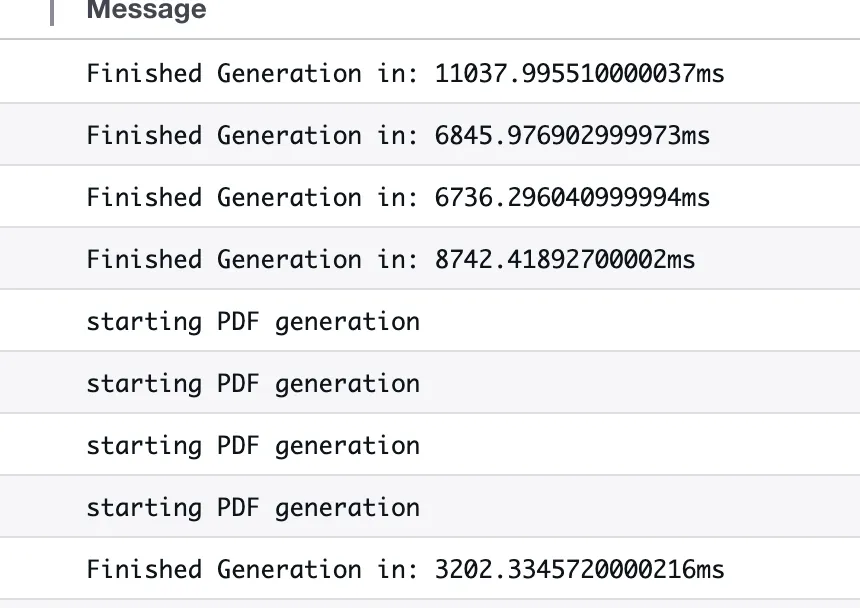
It was time to admit defeat on this one. It seemed, after much analysis, the Yoga rendering engine was taking all of the time, and there was no way to speed it up. So, we switched to a different rendering engine.
Enter PDFKit
We reached for the lower level PDFKit library to handle our PDF generation process. This was after evaluating a few options, and considering using something in Go or Rust as well! But I found this excellent blog post with benchmarks, and it was an easy enough task to try it for myself.
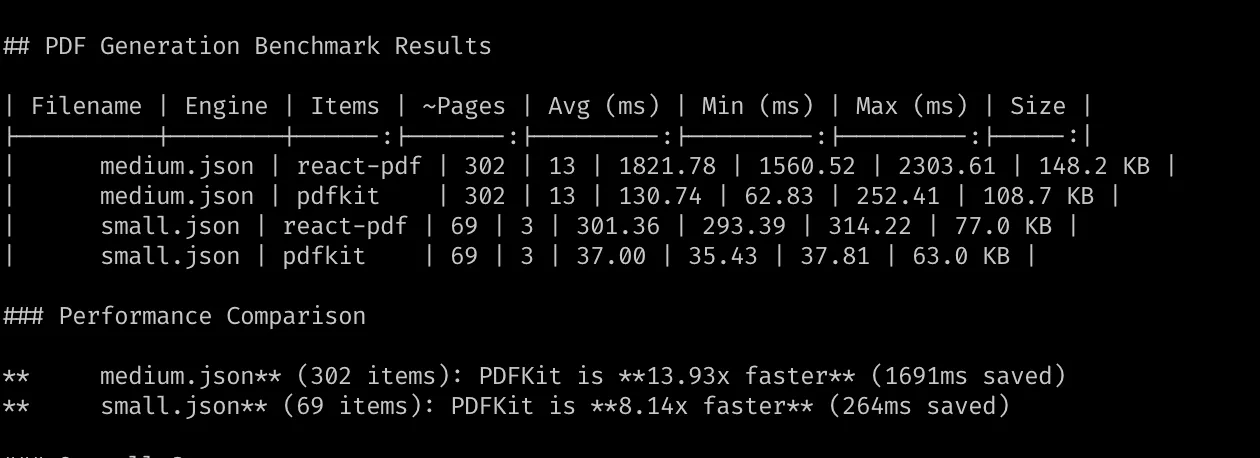
The performance was instantly much better, in our medium template we saw almost a 14x improvement when running locally on my M4 MacBook Pro. With these numbers, we didn’t even need to deploy to ECS, we could just run this in Lambda and be well within our performance goals and not add any extra complexity.
The main downside is the increased developer difficulty of writing PDFKit code vs the simple React approach that everyone is familiar with. The code isn’t too bad, and can actually be abstracted into pretty nice high level functions.
const doc = new PDFDocument({
  size: PAGE.size,
  margin: PAGE.margin,
  bufferPages: true, // Enable buffering for footer rendering
});

const chunks: Buffer[] = [];
doc.on("data", (chunk: Buffer) => chunks.push(chunk));
let y: number = PAGE.margin;

// Header: Logo, Title, Organization, invoice number etc
y = await renderHeader(doc, y, data);

// Invoice Summary: Hours, payments, total
y = renderInvoiceSummary(doc, y, data);

// etc

// Footer: Render on all pages
renderFooter(doc, data);

// Finalize PDF
doc.end();
The main weird thing is manually keeping track of the y coordinate as you render down the page. The library makes it easy enough, mostly just a case of calling doc.heightOfString and incrementing it for all text and images. Beyond that, the API renders out to a Node Buffer and the caller doesn’t know the difference!
So we enabled a gradual rollout, and included some benchmarks in CI as we went. From the GitHub Actions runner, we saw the following:
PDF Generation Benchmark Results
| Filename | Engine | Items | ~Pages | Avg (ms) | Min (ms) | Max (ms) | Size |
|---|---|---|---|---|---|---|---|
| pdf-medium.json | react-pdf | 302 | 13 | 5531.17 | 4158.13 | 7600.15 | 148.3 KB |
| pdf-medium.json | pdfkit | 302 | 13 | 329.25 | 161.07 | 556.83 | 109.1 KB |
| pdf-small.json | react-pdf | 69 | 3 | 887.15 | 875.32 | 906.95 | 77.1 KB |
| pdf-small.json | pdfkit | 69 | 3 | 81.79 | 75.62 | 88.98 | 63.0 KB |
Performance Comparison
pdf-medium.json (302 items): PDFKit is 16.80x faster (5202ms saved) pdf-small.json (69 items): PDFKit is 10.85x faster (805ms saved)
Overall Summary
- Total files: 2
- React-PDF average: 3209.16ms
- PDFKit average: 205.52ms
- Overall speedup: 15.61x
Finale
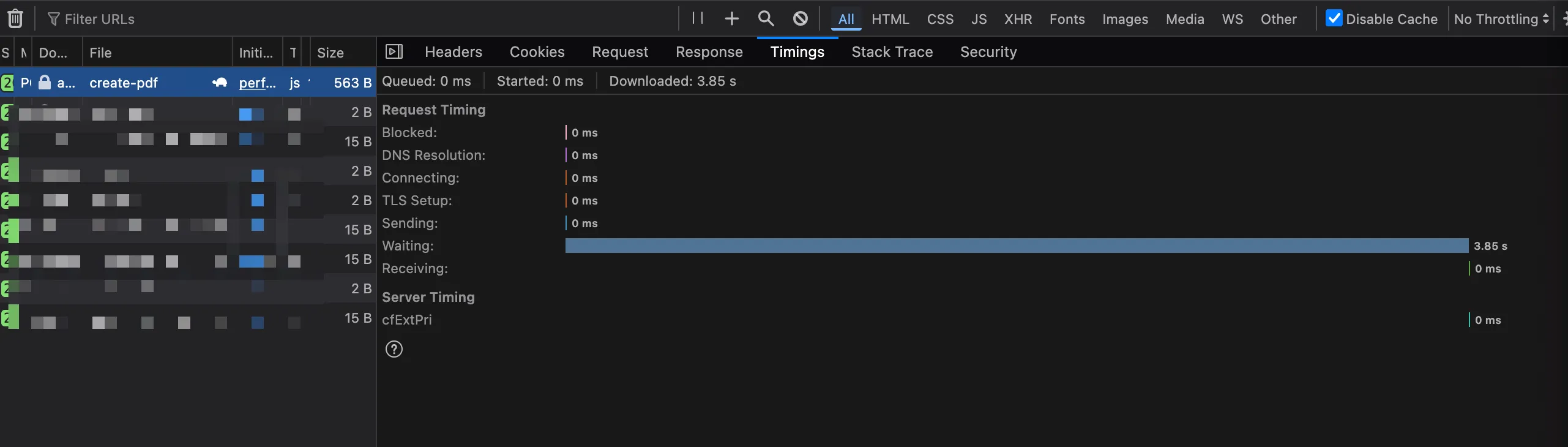
After we were happy with our new template and fully rolled out the feature, we were able to render our worst case 45 page PDFs in around 4 seconds, including the browser round trip time for the request!
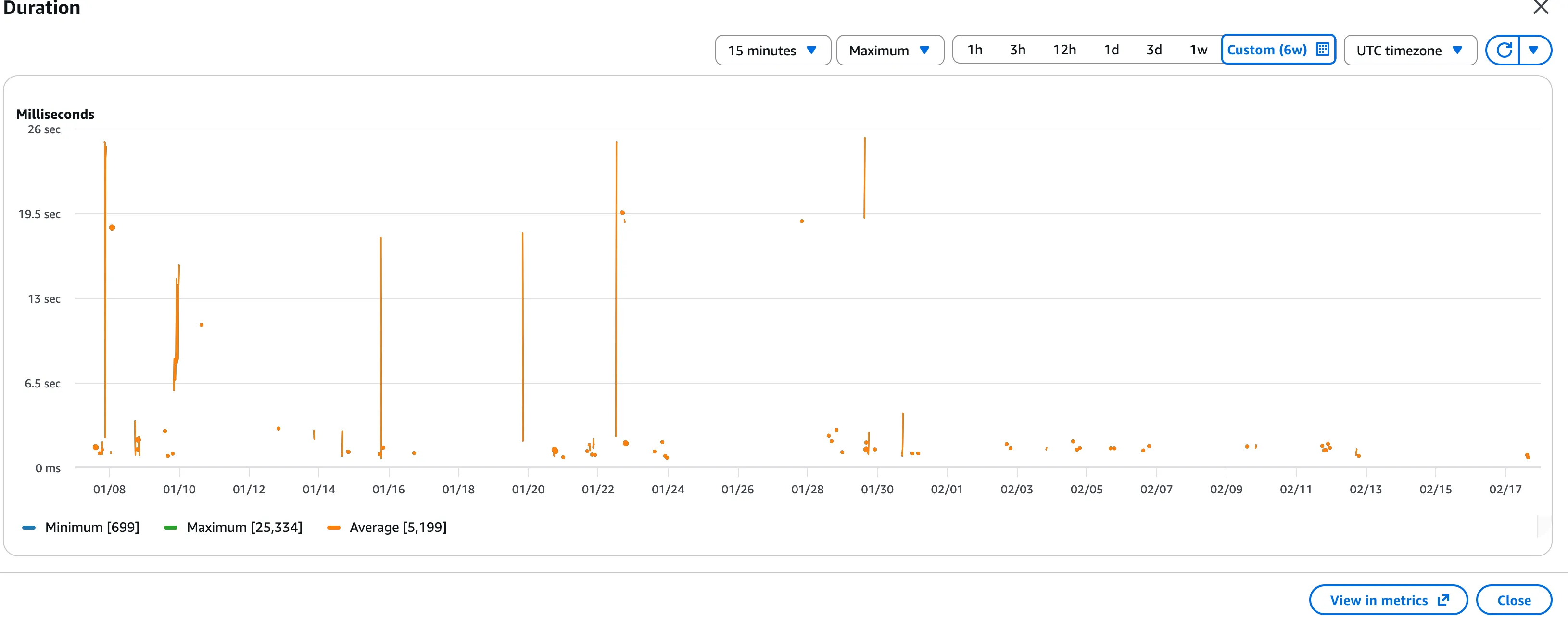
And if we plot our Maximum Lambda execution time in CloudWatch, you can see the clear line around the 02/01 when the new renderer was rolled out to all users.
This is not to bash React PDF, in fact we still use it for a few other PDF templates that are bounded to a specific number of pages due to the ease of use and styling flexibility! But for our main itemized PDF, it was just not up to the task with a large number of pages.
With this approach, we also get to keep using Lambda, and avoid any complexity of changing technology, while having a platform that will scale “forever” without needing to worry.
If you have any questions or comments, reach out to me on LinkedIn for more information!